Tables
- When representing information in a table, you need to think in terms of a grid made up of rows and columns (a bit like a spreadsheet).
- A table represents information in a grid format.
<table> </table>used to create tables.<tr></tr>used to create table row, a register(e.g. employee informations).- ` <td> </td>` use it to create table cell
<th>it used similar to td and i put it inside tr but i use to indicate this is heading cell.
Spanning ColumnS and rows
- The colspan attribute can be used on a
<th>or<td>. - The colspan attribute defines the number of columns a cell should span.
- syntax :
<td colspan="number">. - number : Specifies the number of columns a cell should span.
- rows have the same pattern when we span but we use
<td rowspan="number">. <thead></thead>it create a table header.- ` <tbody> </tbody>` i put table rows and columns inside the body.
- The border attribute was used on both the
<table>and<td>elements to indicate the width of the border in pixels.
example
 <thead>
 <tr>
 <th>Date</th>
 <th>Income</th>
 <th>Expenditure</th>
 </tr>
 </thead>
 <tbody>
 <tr>
 <th>1st January</th>
 <td>250</td>
 <td>36</td>
 </tr>
 <tr>
 <th>2nd January</th>
 <td>285</td>
 <td>48</td>
 </tr>
 <!-- additional rows as above -->
 <tr>
 <th>31st January</th>
 <td>129</td>
 <td>64</td>
 </tr>
 </tbody>
 <tfoot>
 <tr>
 <td></td>
 <td>7824</td>
 <td>1241</td>
 </tr>
 </tfoot>
Domain Modeling
- Domain modeling is the process of creating a conceptual model for a specific problem.
- a domain model is modelling an entity and it’s property and methods, it’s encapsulating objects and this is the basic form of OOP.
Here’s some tips to follow when building your own domain models.
- When modeling a single entity that’ll have many instances, build self-contained objects with the same attributes and behaviors.
- Model its attributes with a constructor function that defines and initializes properties.
- Model its behaviors with small methods that focus on doing one job well.
- Create instances using the new keyword followed by a call to a constructor function.
- Store the newly created object in a variable so you can access its properties and methods from outside.
- Use the this variable within methods so you can access the object’s properties and methods from inside.
OBJECTS: CONSTRUCTOR
- Sometimes you will want several objects to represent similar things.
- Object constructors can use a function as a template for creating objects.
- First, create the template with the object’s properties and methods.
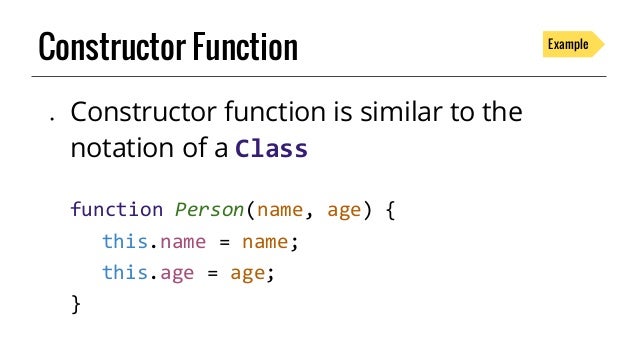 .
.- The this keyword is used instead of the object name to indicate that the property or method belongs to the object that this function creates.
- Each statement that creates a new property or method for this object ends in a semicolon (not a comma, which is used in the object literal syntax).
- The name of a constructor function usually begins with a capital letter.
- The uppercase letter is supposed to help remind developers to use the new keyword when they create an object using that function.
-
syntax invoking the constructor : ` var objName = new ConstructorName( attrib1, attrib2,…)`.
- another example :
   var hotel = new Object();
hotel.name= 'Park';
hotel.rooms = 120;
hotel .booked = 77;
hotel .checkAvailability = function()
return this.rooms - this.booked;
};

var elName = document.getElementByid('hotelName');
             elName.textContent = hotel . name;
 var elRooms = document .getElementByid('rooms');
             elRooms.textContent = hotel.checkAvailability(};
ADDING AND REMOVING PROPERTIES
- to add new property use the dot notation to do this with objects created using obj literal or constructor function.
deletekeyword used to delete property from obj then use dot notation to identify the property or method you want to remove from the object.- example :
var hotel = {
        name : 'Park' ,
        rooms : 120,
        booked : 77.
     } ;
- another example :
THIS (IT IS A KEYWORD)
- The keyword this is commonly used inside functions and objects.
- It always refers to one object, usually the object in which the function operates.
WHAT ARE BUILT-IN OBJECTS?
- Browsers come with a set of built-in objects that represent things like the browser window and the current web page shown in that window.
- These built-in objects act like a toolkit for creating interactive web pages.
- As soon as a web page has loaded into the browser, these objects are available to use in your scripts.
- help you get a wide range of information such as the width of the browser window, the content of the main heading in the page, or the length of text a user entered into a form field.
- You access their properties or methods using dot notation.
these objects are
- BROWSER OBJECT MODEL : The Browser Object Model contains objects that represent the current browser window or tab. It contains objects that model things like browser history and the device’s screen
- DOCUMENT OBJECT MODEL : Model uses objects to create a representation of the current page. It creates a new object for each element (and each individual section of text) within the page.
- GLOBAL JAVASCRIPT OBJECTS : The global JavaScript objects represent things that the JavaScript language needs to create a model of. For example, there is an object that deals only with dates and times.
prototype object
- when we run our object it will be allocated inside the memory.
- when we have many objects inside our code it will consume the memory.
- properties inside the object sometimes execute some code, and it might be complex.
- this process will consume the memory and might crash the browser.
- to solve this problem we create methods of objects seperatley then link it to the constructor using the prototype.
- example
ConstructorName.prototype.method(){
  this.property   // do something
 }
 and use it like so: object.method()